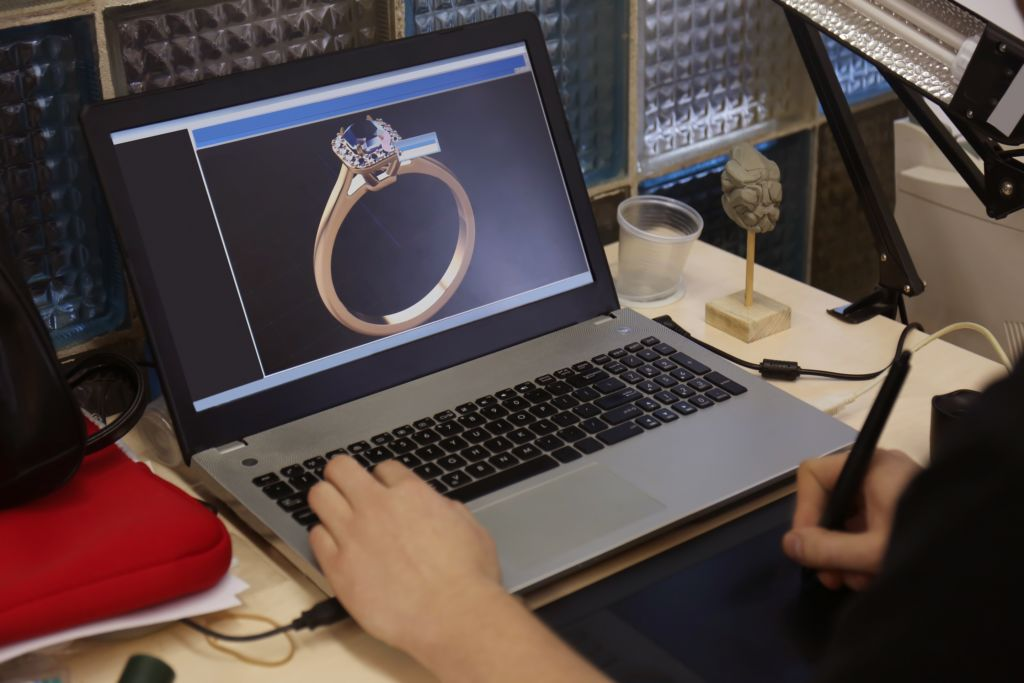
If you have ever waited on a hand-carved wax model, requested a small revision, and watched the timeline reset entirely, you already understand why jewelry brands are moving to digital design.
CAD/CAM has changed custom jewelry manufacturing from a slow, interpretation-heavy process into a precise, repeatable workflow that helps brands move faster without sacrificing quality.
For product teams, the benefit is not just speed—it is control. CAD/CAM makes it easier to refine proportions, test stone layouts, and validate manufacturing feasibility before committing to a physical sample.
It also creates a digital master that can be reused across prototypes, production runs, and reorders, whether you are launching a one-off custom piece or scaling a full collection.
At MJJ Brilliant, CAD/CAM sits at the center of how we move from design intent to finished piece, connecting directly to our full custom jewelry manufacturing process and flexible production programs like our no-MOQ model.
Why Jewelry Brands Are Moving to Digital Design
Traditional development often starts with a sketch, moves to wax carving, then cycles through revisions and new physical samples. The problem is that small changes are rarely small in practice: a shift in prong height or band width can mean rebuilding the model from scratch, adding cost and delay.
Digital design removes that bottleneck. Trend cycles move quickly, customer expectations around fit and finish are high, and errors are expensive — an off-proportion ring or a poorly structured setting can surface later as a remake, return, or quality complaint. CAD/CAM reduces that risk by making design decisions visible early, letting the brand, designer, and manufacturer work from the same source file.
What CAD and CAM Actually Mean
CAD (Computer-Aided Design) is the digital modeling stage, where the piece is built in 3D with exact dimensions, stone placement, and metal thickness. CAM (Computer-Aided Manufacturing) translates that model into physical output—a 3D-printed prototype, a CNC-milled wax master, or production tooling.
CAD/CAM is a workflow, not a single tool; it spans design, revision, and manufacturing prep. That makes it especially valuable for custom one-offs, repeatable collections, and technically demanding styles like pavé, channel, and invisible setting, where precision needs a consistent foundation. See also: how CAD models translate into physical prototypes through 3D printing.
How CAD/CAM Speeds Up Revisions
Digital files allow instant edits—prong height, stone size, band thickness, overall proportions—without starting over. In a traditional workflow, even a modest revision means a new wax and another round of bench work. In a digital workflow, revisions are often turned around in 24–48 hours.
The business impact is immediate: faster approvals, shorter launch timelines, and lower prototype cost per iteration. Brands can also test multiple variations digitally before committing to a physical sample, which is especially useful when comparing stone sizes or setting styles.
Accuracy, Fit, and Manufacturing Consistency
In jewelry, small inaccuracies become visible fast. A ring off by a fraction of a millimeter affects fit; an imprecise stone seat can cause security issues later.
CAD/CAM improves outcomes by making dimensions, tolerances, and stone positions explicit from the start—critical for custom rings, matched bands, and pavé-heavy collections.
What's approved on screen is what gets produced in metal, removing the interpretation gap between brand and bench team and reducing fit issues, setting failures, and unnecessary remakes. This is where CAD-defined seat geometry supports precise, consistent stone setting at production scale.
From Digital File to Physical Sample
The production flow generally follows: reference/concept → CAD model → review/revisions → prototype output → approval → production. The same digital file supports multiple outputs depending on development stage — 3D print, CNC mill, or mold master — which is one of CAD/CAM's biggest operational advantages: the file becomes a reusable production asset, not a one-time exercise.
At MJJ, this integrated flow reduces handoffs between design and production teams, since the same team weighs both aesthetic intent and manufacturing feasibility together.
Why CAD/CAM Matters When Scaling
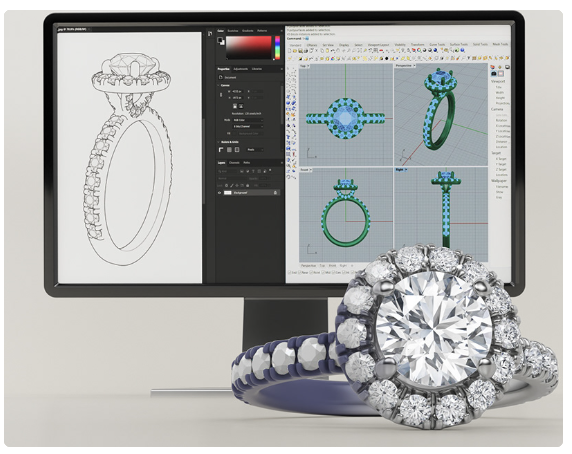
CAD/CAM isn't just for one-offs; it supports repeatable collections at volume. A strong digital master maintains consistency across reorders, resizes, and design variations, turning the design file into a reusable production asset rather than a sample that gets filed away.
That consistency is exactly what supports faster expansion without sacrificing quality control, and it pairs naturally with flexible, no-minimum production runs.
Common CAD/CAM Mistakes
- Overcomplicating the first design, which makes it costly or difficult to manufacture.
- Treating the CAD render as the finished product rather than a design tool—renders don't reveal fit, weight, or structural behavior.
- Approving designs without understanding metal weight, stone security, or feasibility.
- Working with a partner who lacks manufacturing expertise to execute the digital file well.
The best results come when design and production are treated as one conversation, not two separate handoffs.
Frequently Asked Questions
How long does a CAD model take?
Most models are completed in 2–5 business days depending on complexity, with revisions turned around in 24–48 hours.
Can I request changes after seeing the render?
Yes, this is one of CAD/CAM's core advantages. Proportions, stone placement, and finish can be adjusted digitally before any physical sample is produced.
Does CAD/CAM work for both one-offs and full collections?
Both. A file created for a custom piece can also serve as the reusable digital master for a full production run.
What's the difference between a render and a physical prototype?
A render is a digital visualization for design approval. A prototype—often 3D printed—is a tangible sample used to verify fit, scale, and detail before full production.
Does CAD/CAM increase production cost?
Typically not. It reduces overall cost by minimizing revision cycles, prototype waste, and manufacturing errors that would otherwise require rework.
Closing: From Concept to Production, Without the Guesswork
CAD/CAM accelerates the idea-to-finished-jewelry timeline while improving consistency at every stage. At MJJ Brilliant, we're fluent in both design intent and manufacturing feasibility, which means your file becomes jewelry that can be made consistently, efficiently, and at scale.
Book a CAD/CAM consultation with our design team to see how we can turn your concept into production-ready jewelry faster.